 SidebySpeak
 Blog
JotMe Alternative: Live Meeting Translation in Your Browser, From $9.99
SidebySpeak is the closest JotMe alternative for live translated captions in Zoom, Google Meet and Teams in your browser: no bot, your own voice translated too, and 600 minutes for $9.99 a month.

Looking for a JotMe alternative? If you want live translated captions inside Zoom, Google Meet or Microsoft Teams in your browser, with no bot and your own voice translated too, SidebySpeak is the closest alternative. It costs $9.99 a month for 600 minutes of live translation, compared with $20 per user a month for 200 minutes on JotMe Pro (both billed monthly). Here's how they compare, and when JotMe is still the better fit.
Every competitor fact below comes from that company's own page, checked November 2, 2026.
What is JotMe?
JotMe is an AI platform for "real-time translation, transcription, chatbot, and meeting notes across 200+ languages," with apps for Mac, Windows, iPhone, Android and a Chrome extension (jotme.io/pricing). It says it captures audio on your computer, so "no bot joins" the call, and it adds AI meeting notes, recordings, an "Ask JotMe" chatbot and shareable live translation by link or QR code.
Pick by need
- You want translated captions in your own browser calls, and to be understood when you speak: a no-bot live translator like SidebySpeak.
- You run conferences or large multilingual events: an event platform such as Wordly.
- You mainly want recordings, AI notes and summaries, with translation on the side: an AI note-taker with translation, such as JotMe itself or Maestra.
JotMe vs SidebySpeak at a glance
Price (billed month-to-month, USD)
| Plan | Price | Live translation minutes |
|---|---|---|
| SidebySpeak Free | $0 | 20 min/month, no card |
| SidebySpeak Basic | $9.99/month | 600 min |
| SidebySpeak Pro | $19.99/month | 1,500 min |
| JotMe Free | $0 | 20 min/month |
| JotMe Pro | $20/user/month | 200 min |
| JotMe Premium | $30/user/month | 500 min |
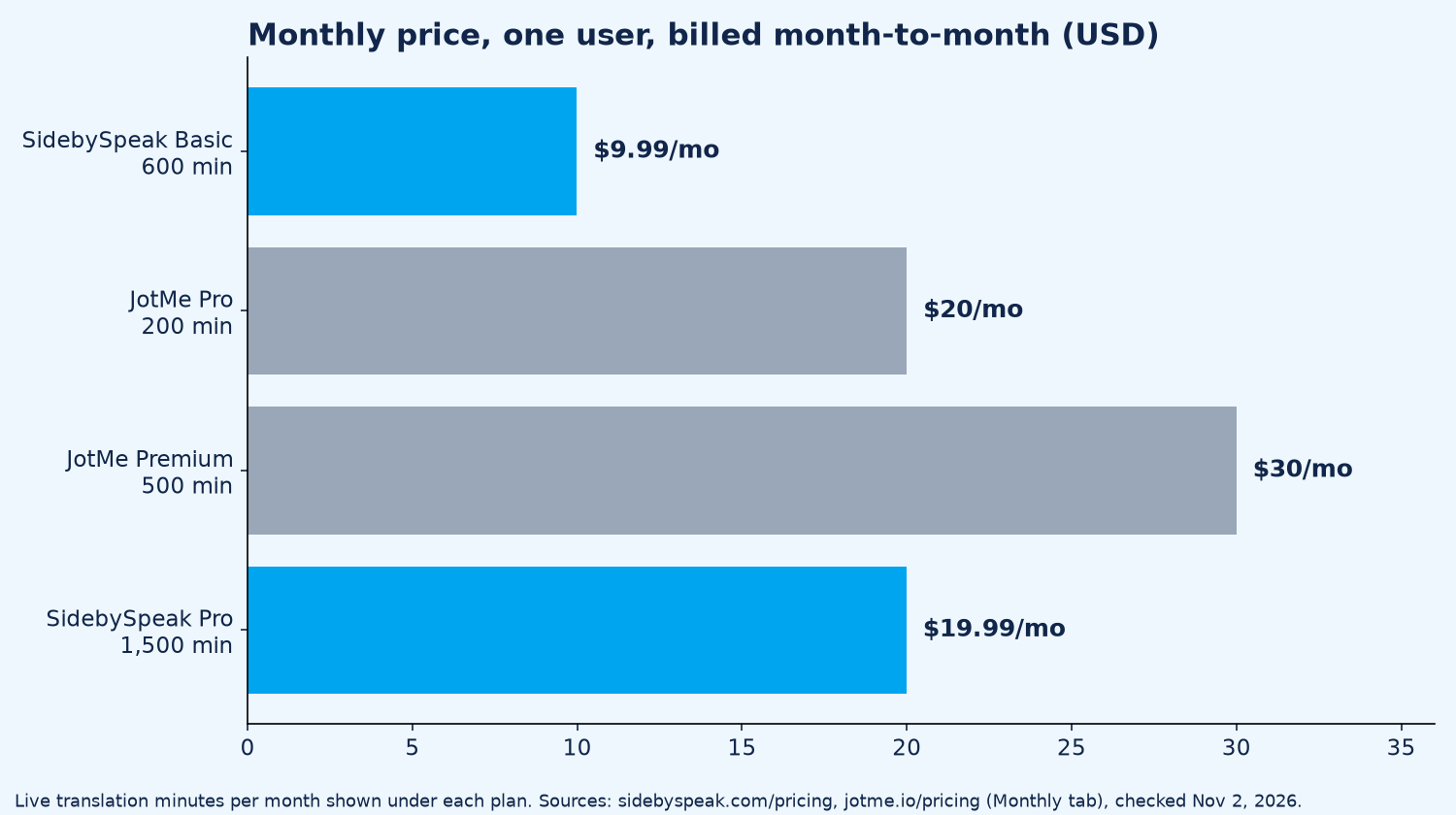
SidebySpeak also has Power ($39.99/month) and Max ($79.99/month) for heavy use. JotMe's annual billing is lower ($10 and $15 per user a month, billed $120 and $180 a year) (jotme.io/pricing, sidebyspeak.com/pricing).
Teams
| SidebySpeak | JotMe | |
|---|---|---|
| Team pricing | From $79.99/month, one shared minute pool | Teams from $60 ("starting price"), billed monthly |
| Per-seat fees | None | Per user on Pro and Premium |
| Admin | Shared pool | Centralized billing and admin dashboard |
How it works
| SidebySpeak | JotMe | |
|---|---|---|
| Bot joins the call | No | No (captures audio on your computer) |
| Where it runs | Chrome or Edge tab | Mac, Windows, iPhone, Android, Chrome extension |
| Languages | 60 | 200+ (vendor claim; varies by mode) |
| Your own mic translated | Yes (optional) | Not advertised |
Notes and transcripts
| SidebySpeak | JotMe | |
|---|---|---|
| Transcripts | Bilingual, saved locally or emailed; .txt / .md | Saved to your JotMe dashboard |
| AI summary | Optional recap, key points, action items | AI meeting notes and summaries |
| Recordings | No audio/video | Yes (plan limits apply) |
Why SidebySpeak is the closest JotMe alternative
- Your own voice translated. SidebySpeak captions "meeting audio and your microphone," so the call is translated for you, and what you say is translated too. The mic is optional: leave it off to translate only the call.
- Nothing to set up for the host. It runs on your side in Chrome or Edge, and "no bot or extra participant joins your call." Works on someone else's Zoom, Meet or Teams link.
- More minutes for less. 600 minutes for $9.99, or 1,500 for $19.99, versus 200 or 500 minutes per user on JotMe's monthly plans.
- Teams without per-seat fees. Teams share one monthly pool of minutes, from $79.99.
- Transcripts stay with you. "We do not store transcripts on our servers." Save them locally or email them, with an optional AI recap.
Honest limits: SidebySpeak "can only hear audio playing in a browser tab," so it can't capture the Zoom desktop app (join from the browser instead). It shows text captions only and never speaks a translated voice into the meeting. It supports 60 languages, fewer than JotMe's 200+, and has no mobile app.
Start free with 20 minutes a month · Add SidebySpeak to Chrome · Setup guides: Zoom, Google Meet, Microsoft Teams
When JotMe is still the better fit
JotMe is good for people who need the Zoom desktop app or a phone, languages outside SidebySpeak's 60, meeting recordings, or in-person translation shared by QR code. If those matter more than price per minute, stay with JotMe.
Other JotMe alternatives
- Maestra: good for teams that want translated meetings plus recordings and summaries. Real-time Meetings plan $49/user/month billed monthly, 2 languages per session (maestra.ai/pricing).
- Wordly: good for conferences and events. "Starts at about $1,500 for a 10-hour package," usable for up to 12 months (wordly.ai/pricing). See our Wordly alternatives.
For a wider list, see the best real-time meeting translation tools, or read how a Chrome extension can translate live meeting captions.
FAQ
How much does JotMe cost?
Billed monthly, JotMe Pro is $20 per user a month (200 minutes of live translation) and Premium is $30 (500 minutes). Teams start at $60. There's a free plan with 20 minutes a month (jotme.io/pricing, checked Nov 2, 2026).
Is there a free JotMe alternative?
Yes. SidebySpeak's free plan gives 20 minutes of live translation every month, no card required.
What is the cheapest JotMe alternative?
For browser calls, SidebySpeak Basic: $9.99 a month for 600 minutes (pricing).
Does SidebySpeak translate what I say?
Yes. Turn on your microphone and SidebySpeak captions and translates your speech too. It's optional.
Does a bot join my meeting?
No. SidebySpeak runs in your browser and nothing joins the call.
Does SidebySpeak work with the Zoom desktop app?
No. It hears audio playing in a Chrome or Edge tab, so join Zoom from your browser. Google Meet and Teams on the web work the same way.
Sources (checked November 2, 2026)
- https://sidebyspeak.com/pricing · https://sidebyspeak.com/ · /faq · /transcripts · /compare/zoom-translated-captions
- https://www.jotme.io/pricing (Monthly tab)
- https://maestra.ai/pricing (checked Nov 1, 2026)
- https://www.wordly.ai/pricing (checked Nov 1, 2026)