
SidebySpeak for Learning
Two optional tools for people learning from real conversations: Learn mode while you listen, flashcards after the call.
Learn mode: live word matching
In Learn mode, matching words and short phrases share a color in the original speech and the translation, so you can find a word's partner at a glance. The picture below is an illustrative preview, not a real call.
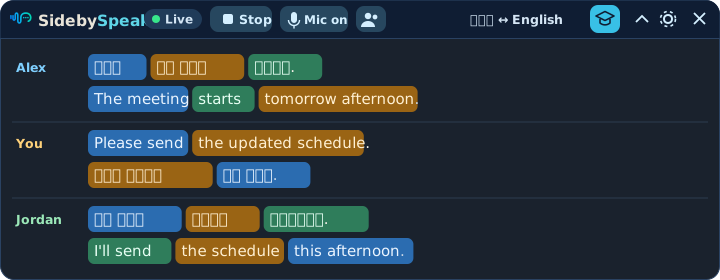
Matching can make mistakes. During a live session, recent completed caption pairs are sent to OpenAI for matching under its own retention rules; SidebySpeak does not store them.
AI flashcards (optional)
When you turn them on in the extension, completed calls with transcript email enabled get up to 15 to 50 cards of the best words or sentences, your choice. Flip the example to see both types.
Selected transcript text is sent to OpenAI to create cards. Transcripts and cards stay in your extension's browser data, not SidebySpeak's server database, queues or logs. If you attach cards to a transcript email, that copy passes through our email provider.