 SidebySpeak
SidebySpeak Blog
Wordly Alternatives in 2026: Lighter Options for Live Meeting Translation
Wordly is priced and built for events. If you just need live translation in your own Zoom, Google Meet or Teams calls, these alternatives are lighter and cheaper to start.

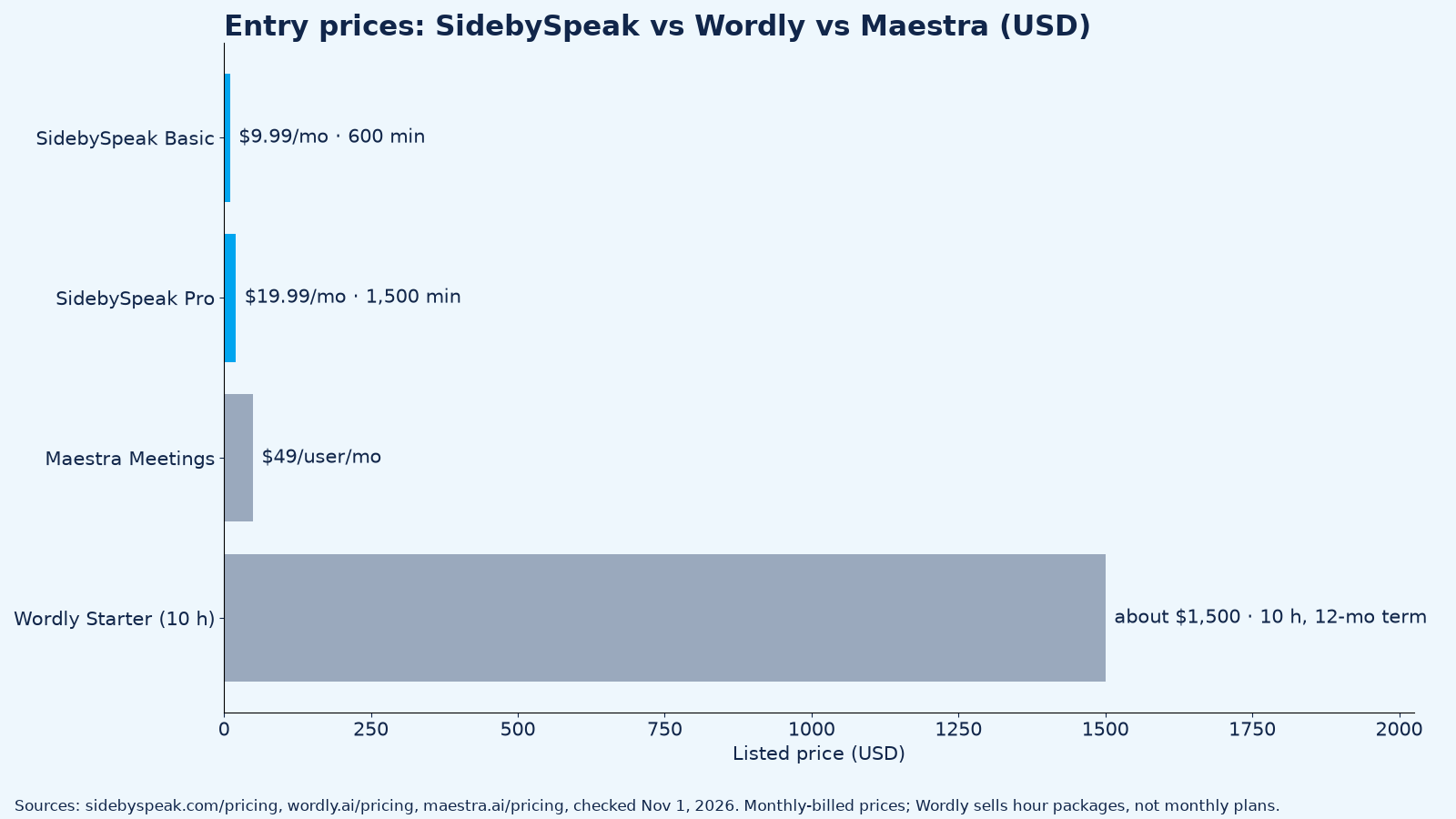
Wordly alternatives make sense when you don't run events. Wordly is an AI interpretation platform sold in hour packages, starting at about $1,500 for 10 hours. If you just need to follow, and be understood in, your own Zoom, Google Meet or Microsoft Teams calls, SidebySpeak does it in your browser for $9.99 a month, with 20 free minutes every month to try.
Every competitor fact below comes from that company's own page, checked on November 1, 2026.
What is Wordly?
Wordly is an AI translation and captioning platform for meetings and events: attendees "use a QR code or link" to get translated audio and captions, and it "works with Zoom, Teams, Meet, WebEx, Cvent, and much more" (wordly.ai, wordly.ai/pricing).
How we compared
- Pricing model: monthly plan or prepaid hours, billed month-to-month where offered.
- Setup: who has to set it up, you or the organizer.
- Platforms and whether you need a browser or a desktop app.
- Languages as published by the vendor.
- Who it's built for.
Comparison table
Price
| Tool | Pricing model | Starting price (USD) |
|---|---|---|
| SidebySpeak | Monthly minutes | Free 20 min/month; $9.99/month (600 min) |
| Wordly | Prepaid hour packages, 12-month term | About $1,500 for 10 hours |
| Maestra (Meetings) | Per user, monthly | $49/user/month |
| KUDO | Pay as you go or subscription | Not published (demo/quote) |
| Interprefy | Custom (hourly, daily or plans) | Not published (contact sales) |
| Built-in captions | Included in qualifying plans | Requires a qualifying plan or add-on |
Setup and fit
| Tool | Setup | Platforms | Languages (vendor claim) | Good for |
|---|---|---|---|---|
| SidebySpeak | Install the Chrome or Edge extension; no host setup, no bot | Meet, Zoom, Teams in a Chrome/Edge tab | 60 | Individuals and small teams in their own calls |
| Wordly | Organizer sets up sessions; attendees join by link or QR code | Zoom, Teams, Meet, WebEx, Cvent and more | Over 60 ("dozens of languages") | Conferences, events and organization-wide meetings |
| Maestra (Meetings) | Web app | Zoom, Meet & Teams | 2 languages per session | Teams wanting translated meetings plus recordings and summaries |
| KUDO | Organizer books AI or human interpretation | Zoom, Webex, MS Teams "and more" | 200 (human), 70+ (AI) | Events needing professional human interpreters |
| Interprefy | Organizer | Meetings and events | Not published on pricing page | Large multilingual events |
| Built-in captions | Host or admin enables Zoom / Meet / Teams translated captions | Each platform only | Varies by platform | Companies already on the right plan |
The alternatives, one by one
1. SidebySpeak: the best Wordly alternative for your own calls
SidebySpeak is a Chrome and Edge extension that shows live translated captions for meeting audio, in two languages side by side. It translates what you say, too: turn on your microphone and your own words are captioned and translated. The mic is optional, so you can leave it off and just follow the call.
- Why it beats Wordly for everyday calls: no organizer setup, no packages, no bot. "No bot or extra participant joins your call." You install it and it works in Meet, Zoom or Teams in your browser.
- Pricing (billed monthly): Free 20 min/month (no card required); Basic $9.99 (600 min); Pro $19.99 (1,500 min); Power $39.99 (4,200 min); Max $79.99 (9,600 min). Teams share one minute pool from $79.99/month, with no per-seat fees (pricing).
- Extras: bilingual transcripts saved locally or emailed, and optional Learn mode. Learn mode and AI recaps are off unless you turn them on. When you use them, only the caption text (never your audio) is sent to OpenAI to create the explanation or recap.
- Limits: captions only, no translated voice, and it hears audio in a browser tab, so join Zoom or Teams on the web rather than the desktop app.
Add SidebySpeak to Chrome · Setup guides: Zoom, Google Meet, Microsoft Teams
2. Wordly
- What it is: AI interpretation for meetings and events, with translation, captions, transcripts and summaries "for one fixed price" (wordly.ai/pricing).
- Good for: conferences, webinars and in-person or hybrid events where many attendees need many languages.
- Pricing: "Pricing starts at about $1,500 for a 10-hour package which can be used in any increment for up to 12 months." Packages run 10, 25, 50, 100, 250 and 500+ hours; you pay only for minutes used. Volume, multi-year, non-profit and education discounts are listed (wordly.ai/pricing).
- Limits: no monthly plan; it's built around an organizer running sessions, not one person joining someone else's call.
3. Maestra
- What it is: a real-time translation web app with plans for personal use, meetings and events (maestra.ai/pricing).
- Good for: teams that want translated meetings with recordings, transcripts and AI summaries.
- Pricing (billed monthly): Personal $19/month (sessions up to 15 min); Meetings $49/user/month (sessions up to 75 min, Zoom, Meet & Teams, 2 languages per session); Organizations $449/month; Events from $799/day. Annual billing is lower ($15, $39, $359).
- Limits: per-user pricing and session-length caps.
4. KUDO
- What it is: AI speech translation and captions plus professional human interpretation for meetings and events (kudoway.com/pricing).
- Good for: events where you want booked human interpreters, including sign languages.
- Pricing: pay-as-you-go and subscription plans; prices are not published (request a demo).
5. Interprefy
- What it is: AI speech translation and remote human interpretation for meetings and events.
- Good for: large multilingual events.
- Pricing: "custom pricing", with hourly, daily or recurring plans (interprefy.com/pricing).
6. Built-in translated captions in Zoom, Meet and Teams
- Good for: companies already paying for a qualifying plan. Google Meet translated captions need eligible Workspace editions (Google support); Teams live translated captions need Teams Premium or a Microsoft 365 Copilot license (Microsoft support); Zoom needs a qualifying plan or the Translated Captions add-on.
- Limits: the host or admin controls it, so a guest can't turn it on in someone else's meeting.
Who should pick what
- You join Zoom, Meet or Teams calls and need translation now: SidebySpeak, from free.
- You run a conference or large event: Wordly, KUDO or Interprefy.
- Your company already has the right plan: the platform's built-in captions.
For a wider look beyond Wordly, see the best real-time meeting translation tools.
FAQ
How much does Wordly cost?
Wordly starts at about $1,500 for a 10-hour package, usable for up to 12 months, according to wordly.ai/pricing. Larger packages and discounts are available through sales.
Does Wordly have a free plan?
Wordly's pricing page doesn't list a free plan; it offers "Try it now" and demo links. SidebySpeak's free plan gives 20 minutes every month with no card.
What is the cheapest Wordly alternative?
For your own calls, SidebySpeak starts free and costs $9.99/month for 600 minutes (pricing).
Does SidebySpeak work with Zoom, Google Meet and Teams?
Yes, in a Chrome or Edge tab. See the Zoom, Meet and Teams guides.
Can SidebySpeak translate what I say?
Yes. Turn on your microphone and SidebySpeak captions and translates your speech too. It's optional; leave the mic off to translate only the call.
Does a bot join my meeting?
No. SidebySpeak runs in your browser, and no bot or extra participant joins the call.
Sources (checked November 1, 2026)
- https://sidebyspeak.com/pricing
- https://www.wordly.ai/pricing · https://www.wordly.ai/
- https://maestra.ai/pricing
- https://www.kudoway.com/pricing
- https://www.interprefy.com/pricing
- Google Meet and Microsoft Teams support pages above (checked October 31, 2026)