
Transcripts
Keep the original speech and its translation after a call. Save it in your browser, download it, or email it to yourself. SidebySpeak does not store audio recordings or transcripts on its servers.
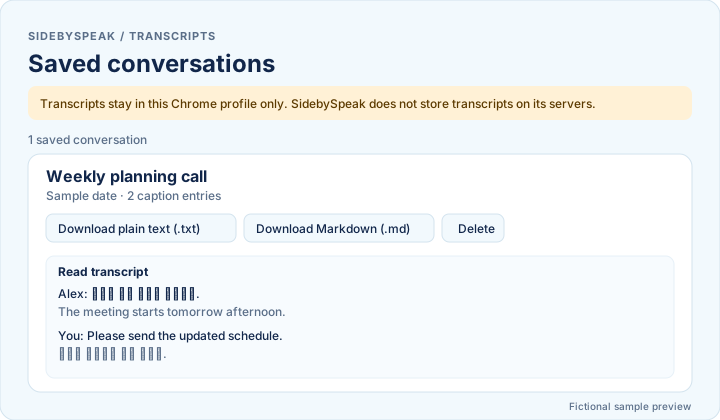
Save to the local archive
- In the extension, open Settings, then Transcripts, and turn on Save to local archive.
- Run your call. Press Stop to finish saving.
- Choose Open archive to view saved conversations, read them, and download a plain text (.txt) or Markdown (.md) file, or delete one.
Enable saving before your next call. Past sessions that were not saved cannot be recovered. There is no audio or video playback.
Transcript emails
- In Settings, then Transcripts, turn on Send transcript emails. This is separate from saving locally.
- Use the account controls to save and verify your destination address.
- Press Stop. The email is sent after the call, as a short message with a text attachment.
Enable emailing before your next call and keep the extension open and connected until sending is accepted. Acceptance by the email provider does not guarantee inbox delivery, so check spam too. Local saving and emailing work independently.
Privacy
- Local transcripts are not encrypted and are tied to your browser profile. Clearing extension storage or uninstalling can remove them. Downloaded and emailed copies are separate.
- SidebySpeak does not save audio recordings or store transcript or card text in its server database, queues or logs.
- Processing is not all on your device. Live audio is relayed through our service to Soniox. Optional learning, cards and summaries send relevant text to OpenAI.
- Emailed attachments pass transiently through SidebySpeak and Resend. Email providers and your inbox may keep copies.
- We keep account, billing and usage records on our servers—not recordings or transcript content.
Speech, AI and email providers apply their own processing and retention rules. Read the full privacy policy for those details. Flashcards from your calls are covered on the Learning page.