 SidebySpeak
 Blog
How to Do Chinese to English Speech Translation for Free
The fastest way to do Chinese to English speech translation for free is to match the tool to the situation. Use a phone app such as Google Translate for a quick face-to-face exchange. Use a browser ex...
The fastest way to do Chinese to English speech translation for free is to match the tool to the situation. Use a phone app such as Google Translate for a quick face-to-face exchange. Use a browser extension for a live video call. For a recorded file, transcribe the Chinese first, then translate the text. Each method takes a few minutes to set up, and none needs a credit card to start.
The trouble is that search results lump these jobs together. A traveler asking for the train station, a buyer on a call with a supplier in Shenzhen, and a student with a recorded lecture all type the same phrase, yet they need different tools. Mandarin adds its own problems. Tones and homophones mean one misheard syllable can change the message, and polite phrasing often hides the real answer.
This guide walks through four steps: translating a quick phrase, captioning a live meeting, converting an audio file, and checking the result before you act on it. We build SidebySpeak, a browser extension for live meeting captions, so we cover it in the meeting step. We also say plainly where a simpler free tool does the job better.
Which Chinese speech translation tool fits your situation
Speech translation converts spoken Mandarin to Chinese text, then to English, and the right tool depends on whether you are in a conversation, on a call, or holding a file. Pick the method first. Comparing apps comes second.
Three situations, three tools
Most people land in one of three cases. The table shows which method fits each and what you get back.
| Your situation | Best method | Cost to start | What you get |
|---|---|---|---|
| Quick question, face to face | Phone app in conversation mode | Free | English text and spoken English |
| Live video call or webinar | Browser extension that captions tab audio | 20 free minutes a month with SidebySpeak | Chinese and English captions side by side |
| Recorded audio or video file | Transcribe to Chinese text, then translate | Free tools exist for short files | English text you can edit and save |
If you only need one phrase, stop at Step 1. If you sit in meetings with Mandarin speakers every week, skip ahead to Step 2.
Choose the tool by the situation you are in, not by the longest feature list.
Why Mandarin trips up speech tools
Mandarin is a tonal language, so the same syllable means different things at different pitches. The classic business example is mǎi (买, buy) against mài (卖, sell). A tool that mishears the tone can reverse who is buying. Numbers are another weak spot, because sì (四, four) and shí (十, ten) are easy to confuse on a noisy line.
Context matters as well. Spoken Mandarin drops subjects and leans on shared understanding, so a good tool needs the sentences around a phrase to translate it well. Keep these limits in mind in every step below. Clear audio and one speaker at a time improve results more than any setting.
Step 1. Translate a quick phrase with your phone
For a short exchange, Google Translate on your phone is the quickest free answer to "can Google translate a voice?" Yes. Open the app, tap the microphone, speak, and it shows the translation and can read it aloud. The same microphone button works in the browser version.
Set it up in under a minute
- Open Google Translate and set the source language to Chinese (Simplified) for Mandarin and the target to English.
- Tap Conversation if you are talking with another person. The app listens in both languages and alternates between speakers.
- Tap the microphone and speak one or two sentences at a time.
- Tap the speaker icon to play the English aloud, or show the screen to the other person.
Microsoft Translator offers a similar conversation feature if you prefer it. Both are free, and both are built for short turns, not hour-long talks.
Get cleaner results
Hold the phone close and wait for the app to finish before the other person speaks. Short, complete sentences work better than rambling ones. If a result looks odd, say it again with a different structure, for example "Where is the subway station?" instead of a fragment.
This is also the answer if you wonder how to get spoken English from Chinese audio. Speak or play the Chinese near the phone, then tap the speaker icon on the English result. Full dubbing of a long file into a new voice track is a separate job that phone apps do not cover.
A phone app is the right tool for a few sentences, and the wrong one for a meeting that runs an hour.
Step 2. Translate a live Chinese meeting
For a video call, install a browser extension that captions the call's tab audio. SidebySpeak does this in Chrome or Edge, shows the original speech with its English translation, and no bot joins the meeting. The other participants see nothing and approve nothing. It works with Google Meet, Zoom and Microsoft Teams in the browser, and with other browser-based calls.

Install and start
- Create a free account on SidebySpeak.
- Download the extension ZIP and install it in Chrome or Edge.
- Sign in from the extension.
- Join your call in a browser tab.
- Press Start, then choose Chinese as the spoken language and English as the translation.
- Turn on the optional microphone captions if you want your own speech captioned too.
Chinese is one of 60 supported languages, and every plan includes the full catalog. Learn mode is optional, and it highlights matching words between the speech and its translation, which helps if you are also studying Mandarin.
What it costs for a real call
Usage is metered by the minute of live call, and tab plus microphone together count as one minute. The Free plan gives you 20 minutes a month with no card. That is enough to test a real call, but not to run weekly meetings.
Here is a worked example. You hold a 45-minute call with a supplier four times a month. That is 180 minutes, or 3 hours. The Free plan covers less than half of one call. Basic costs $9.99 a month and includes 10 hours (600 minutes), so it covers that schedule with room for about nine more calls. Pro at $20 a month adds 25 hours if you are on calls daily. Teams can share one pool of minutes from $80 a month with no per-seat fees.
On privacy, saved transcripts stay in your browser profile and are not stored on SidebySpeak servers. Live audio is relayed to the speech provider Soniox, which states that it does not retain real-time audio or use it for training.
Test a live-caption tool on your 20 free minutes with a real call before you pay for anything.
Step 3. Turn a Chinese audio file into English text
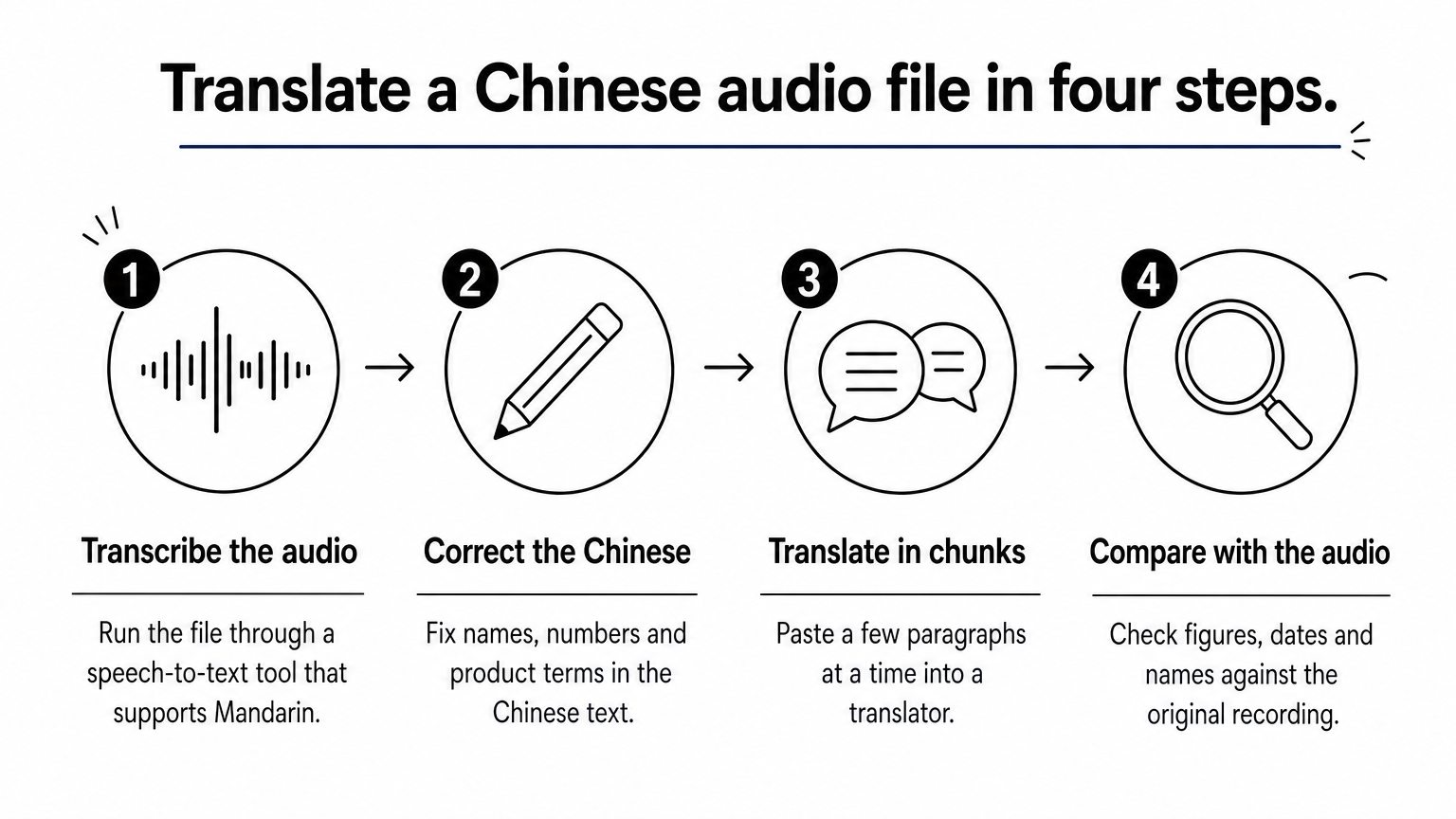
To translate a recorded file, transcribe the Chinese audio into Chinese text first, then translate that text into English. Splitting the job in two lets you fix recognition errors before they spread into the translation, where they are harder to spot.
The two-stage method
- Run the file through a speech-to-text tool that supports Mandarin. Many free tools and video platforms offer automatic Chinese captions for short files.
- Read the Chinese text and correct names, numbers and product terms. This is the cheapest place to catch an error.
- Paste the corrected text into a translator, in chunks of a few paragraphs for long recordings.
- Compare any figures, dates and names against the original audio.
Trim silence, music and cross-talk from the start of the file if you can. A recording with one speaker and little noise will transcribe far better than a crowded conference room.
Play it in a browser tab
For a Chinese webinar, interview or lecture that plays in a browser, you can skip the file handling. SidebySpeak captions the audio of the browser tab, so playing the video in a Chrome or Edge tab and pressing Start gives you live Chinese and English text as it plays. The extension is built for meeting audio, so try it on your free minutes with your own material first. Afterward, save or download the transcript, or have it emailed to you.
If you need to transcribe Chinese audio to English from a file stored on your computer and no tab plays it, use the two-stage method above.
Fix the Chinese transcript before you translate it, because errors in the first stage multiply in the second.
Step 4. Check the translation before you rely on it
Treat every machine translation of Mandarin speech as a strong draft, and verify anything that carries money, dates or commitments. Accuracy is high with a clear voice and clean audio. It drops with background noise, overlapping speakers and strong regional accents.
Check the words that carry risk
Go through the transcript for these items before you act on it:
- Numbers and prices. Read them back to the speaker. Confusions such as 四 and 十 are common.
- Buy and sell, yes and no. Tone errors like mǎi and mài flip meaning.
- Names and product terms. Compare spellings against your own documents.
- Polite deferrals. A phrase like 我们考虑一下 ("we'll think about it") is often a soft no in business talk, even when the English looks neutral.
When a line matters, ask the speaker to repeat it or confirm in writing. In a live tool, keep the original Chinese visible beside the English so a bilingual colleague can catch nuance.
Keep a record
After any important call, save the transcript the same day. Note decisions and numbers in your own words, and send a short written summary to the other side. A written follow-up fixes most spoken misunderstandings before they cost anything, and it works with every tool in this guide.
If a mistranslated line could cost money, confirm it in writing instead of trusting one pass of any tool.
Start with the free minutes
Chinese to English speech translation comes down to three decisions. Use a phone app for quick, in-person phrases. Transcribe first and translate second for files. For live video calls, use a tool that captions the tab audio without sending a bot into the meeting. Then verify numbers, names and polite deferrals, because Mandarin punishes careless trust in a single pass.
If your Mandarin conversations happen on Google Meet, Zoom or Teams, try SidebySpeak with the 20 free minutes on your next call and see the Chinese and English captions side by side before deciding on a paid plan.