 SidebySpeak
 Blog
AI Voice Translator: 5 Tools for Live, Free, and Mobile Use
The best AI voice translator depends on what you need translated. For live video calls, SidebySpeak captions and translates the meeting inside your browser. For finished recordings, NoteGPT and Adobe...
The best AI voice translator depends on what you need translated. For live video calls, SidebySpeak captions and translates the meeting inside your browser. For finished recordings, NoteGPT and Adobe Firefly handle audio online with little setup. For travel, a phone app such as AI Translate Voice Translator is the simplest choice, and Maestra suits presenters who want listeners to hear a translated voice.
Most lists blur three different jobs together: translating a live conversation, converting a recording, and translating on a phone. A tool that is strong at one is often weak at another. That is why people try three apps and still end up reading captions in the wrong language.
This article sorts five tools by the job each one does best, so you can pick in a few minutes. SidebySpeak is our product, so it is listed first and judged on the same questions as the others. The free options here are SidebySpeak's 20 minutes a month, NoteGPT and Adobe Firefly's Translate Audio. Facts about the other tools come from their own pages, so check current limits and pricing before you commit.
1. SidebySpeak for live meeting translation
SidebySpeak is the pick if your conversation happens in a browser tab. It is a Chrome or Edge extension that translates meeting audio and, optionally, your own microphone, as the call runs.
What it does
You see the original speech next to its translation, in real time. Nothing joins the call, so no bot needs approval and other participants notice nothing. It works with browser calls on Google Meet, Zoom, Microsoft Teams and other browser-based platforms.
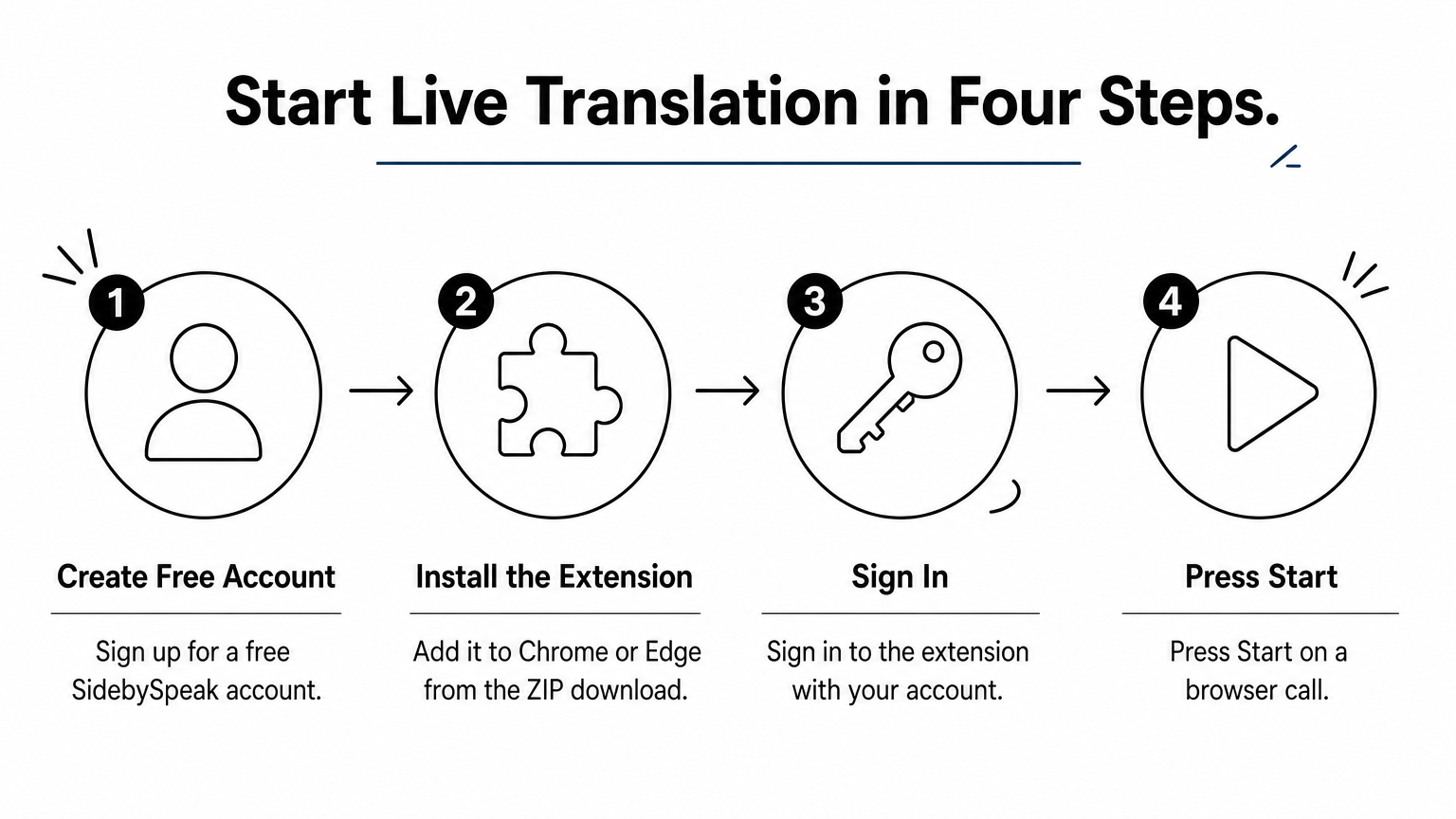
It covers 60 languages, from English, Korean and Spanish to Swahili and Welsh. Saved transcripts stay in your browser profile, not on company servers, and you can download or email them. Live audio goes to the speech provider Soniox, which states that it does not retain real-time audio or use it for training. Setup is short: create a free account, install the extension from the ZIP download, sign in and press Start on a browser call. An optional Learn mode highlights matching words between speech and translation and can generate AI flashcards.
If the conversation happens in a browser tab, translate it there and leave the call itself untouched.
Who it suits and what it costs
It suits professionals, freelancers, remote workers and expats who sit in meetings in a language they only partly speak, and learners who want vocabulary from real speech. It is a desktop browser tool, so it is not a pocket phrasebook for travel. Every plan includes the full language catalog, tab and optional microphone captions, transcripts and Learn mode.
| Plan | Price | Live minutes per month |
|---|---|---|
| Free | $0 | 20 |
| Basic | $9.99 | 600 (10 hours) |
| Pro | $20 | 1,500 (25 hours) |
| Power | $30 | 3,000 (50 hours) |
Tab and microphone together count as one minute. Four one-hour calls a month use 4 hours, so Basic covers that with room to spare, and the free 20 minutes let you test one real call first. Paid plans can buy top-ups that never expire. Team plans start at $80 a month with one shared pool of minutes and no per-seat fees.
2. Maestra Live Translate for translated voice output
Maestra Live Translate is built for situations where listeners should hear the translation, not only read it. It pairs real-time audio translation with AI voice cloning.
What it does
Maestra's live tool runs online and advertises 125+ languages with low latency. Its voice cloning aims to keep the translated speech sounding like the original speaker. It also lists integrations and sharing options, which matter when an audience joins from different places.
Choose a voice-cloning tool only when your audience needs to hear the translation, not just read it.
Who it suits and what it costs
It fits presenters, trainers and teams running talks or webinars for mixed-language audiences. For a one-on-one meeting where you only need to follow along, captions are usually enough. Pricing is worth checking on the live page, along with any free allowance, before you plan an event around it.
3. NoteGPT AI Voice Translator for quick free recordings
NoteGPT is the easiest way to run AI speech translation on a recording without making an account. Its page describes a free online tool that needs no sign-up.
What it does
You translate voice to voice in your browser. The tool says it supports long audio and batch translation, so you can queue several files instead of repeating the steps. It is aimed at recorded material rather than a live call.
For a one-off recording, a no-sign-up web tool beats installing anything.
Who it suits and what it costs
It suits students, researchers and anyone with a voice memo, lecture or interview in another language. It is free to use online. Free web tools often limit file length or output quality, so test a short clip with your own accent and audio before you upload a long file.
4. Adobe Firefly Translate Audio for creators
Adobe Firefly's Translate Audio is a free option for translating audio recordings, backed by a well-known software brand.
What it does
You upload a recording and get it back translated, and Adobe says this takes minutes. It offers 15+ languages, including German and Italian. That list is the shortest in this article, so check that your pair is on it before you start.
A short language list is fine when your language pair is on it.
Who it suits and what it costs
It suits creators, podcasters and marketers who already work with audio and want a quick translated version of a clip. Adobe describes the feature as free. It is not designed for translating a live meeting, so pair it with a live tool if you need both.
5. AI Translate Voice Translator for your phone
AI Translate Voice Translator is an Android app on Google Play, and it is the pick when you are standing in an airport, shop or taxi and your laptop is nowhere near.

What it does
The app translates voice and text and combines voice recognition with spoken playback, so you can hear the translation read aloud. Its listing claims more than 120 languages. You speak, it translates, and you show or play the result to the other person.
On a phone, speed and one-tap speech matter more than transcripts.
Who it suits and what it costs
It suits travelers and anyone who needs short, face-to-face exchanges. It is less suited to a long meeting, where you want a saved transcript and continuous captions. The store listing shows current pricing and any in-app purchases, so read it before you install.
Pick the tool that matches the job
Match the tool to the situation. Use a browser extension for live calls, an online tool for recordings, a voice-cloning platform for audiences, and a phone app for travel. Free tiers and no-sign-up tools make it cheap to test two or three on your own audio before you pay for anything.
If your translation problem lives in video meetings, you can try SidebySpeak free on your next call. The free plan gives you 20 minutes a month with no card, enough to judge accuracy in your own languages.