 SidebySpeak
SidebySpeak Blog
English to Chinese Voice Translator: 5 Best Tools to Try
The best English to Chinese voice translator depends on where you do the talking. For live video meetings, SidebySpeak is the strongest pick because it captions and translates call audio inside your b...
The best English to Chinese voice translator depends on where you do the talking. For live video meetings, SidebySpeak is the strongest pick because it captions and translates call audio inside your browser. For face-to-face chats, JotMe, Whisperr and Google Translate each work well. For recorded audio, ElevenLabs is the better fit. A good tool handles Mandarin in both directions, keeps the delay short, and lets you test it before you pay.
Most voice translators are built for one situation, such as a traveler asking for directions. They fall apart when you need to follow an hour-long call with a Mandarin-speaking client. AI can translate speech, but the tools differ in what they listen to, whether they show text or speak aloud, and what happens to your audio. Those differences decide which tool is right for you.
This list covers five tools. Each entry explains how it works, who it suits and what it costs, so you can compare them directly. SidebySpeak is our own tool, so it comes first, and I say plainly where it does not fit.
1. SidebySpeak: best for live video meetings
How it works
SidebySpeak is a Chrome or Edge extension that captions and translates the audio playing in your browser tab. Nothing joins the call, so there is no bot for anyone to approve. If you switch on your microphone, your English also appears as Chinese text next to the original speech. A colleague speaking Mandarin shows up as English captions. As an English to Chinese voice translator for meetings, it keeps the whole call in one browser tab and shows the text in real time. It supports 60 languages, Chinese included, on Google Meet, Zoom, Microsoft Teams and other browser calls.
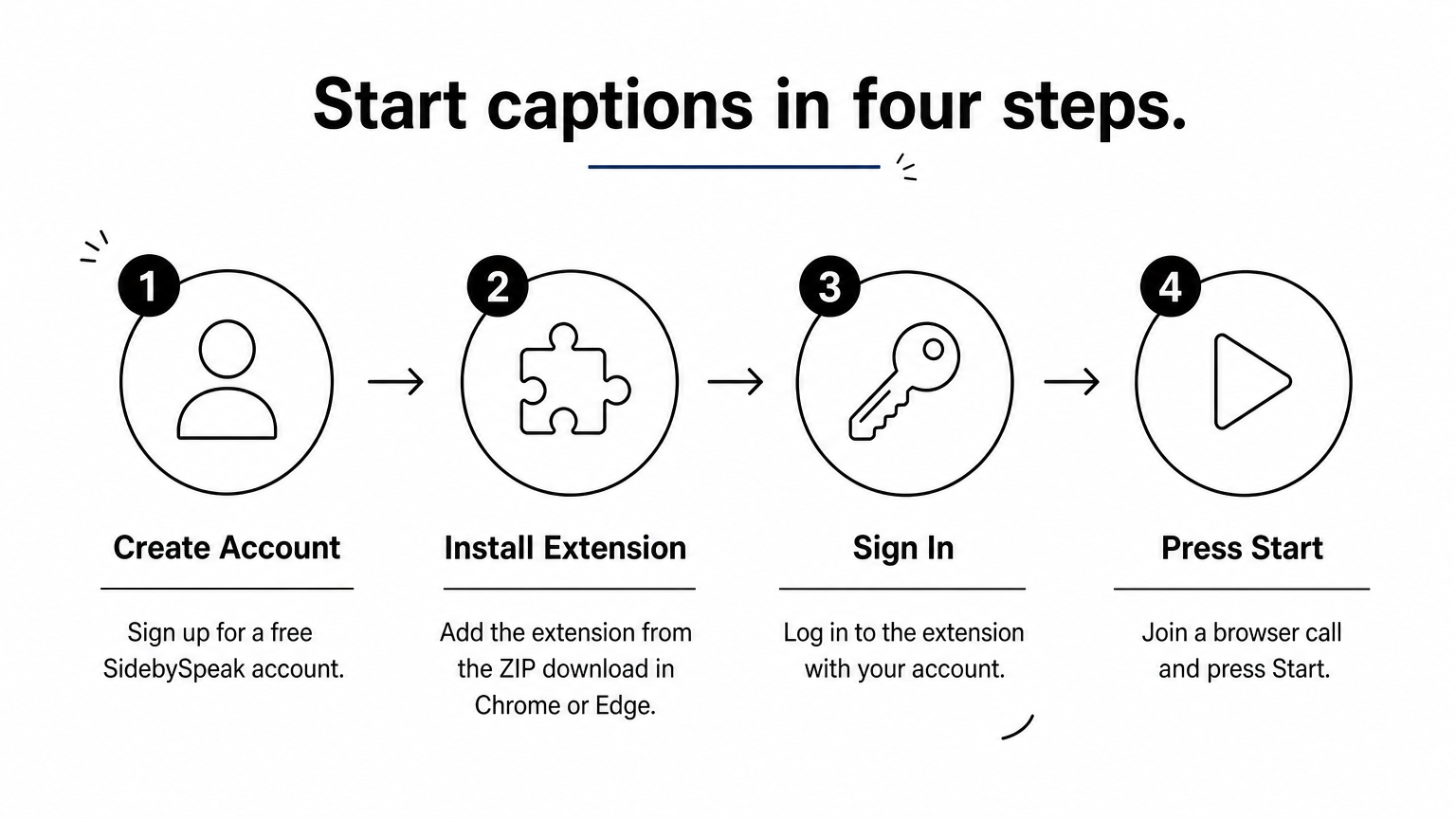
Setup takes four steps:
- Create a free account.
- Install the extension from the ZIP download in Chrome or Edge.
- Sign in.
- Join a browser call and press Start.
Translating the tab means the other person never has to install, approve or notice anything.
Who it suits and what it costs
It suits professionals, remote workers and expats who sit in Chinese-English meetings often. It gives you text on screen, not a spoken voice, so it is not a pocket phrasebook. Saved transcripts stay in your browser profile, and no audio recordings are stored. Live audio is relayed to the speech provider Soniox, which says it does not retain real-time audio. Learn mode also highlights matching words between speech and translation, which helps learners.
Every plan includes the full language catalog. You pay only for minutes, and tab plus microphone together count as one minute.
| Plan | Price | Monthly allowance |
|---|---|---|
| Free | $0 | 20 minutes |
| Basic | $9.99 | 10 hours |
| Pro | $20 | 25 hours |
| Power | $30 | 50 hours |
| Team plans | from $80 | One shared pool, no per-seat fees |
Two 45-minute calls a week for four weeks come to 360 minutes, or 6 hours. That fits inside Basic.
2. JotMe: best for a quick test in the browser
How it works
JotMe's live translation page runs in your browser with no installation. Its Chinese to English page opens set to Simplified Chinese (Mainland) and English. You press Start, allow microphone access and speak. You then read the original transcript and the translation together as they update. To use it as an English to Chinese voice translator, swap the two language selectors.
Speak in full sentences and pause at the end of each one, because short fragments give the engine less context to work with. JotMe also describes its translation as contextual. It follows the conversation rather than translating word by word, which helps with idioms and unfinished sentences.
JotMe is the fastest way to hear what your own Mandarin or English looks like after translation.
Who it suits and what it costs
It suits a one-off conversation, a pronunciation check or a short test before you commit to a tool. The output is a live transcript and translation, so you read it rather than hear it. The page advertises free use with no signup. It does not state session limits, so check them before you rely on it for a long meeting.
3. Whisperr: best for two-way chats on your phone
How it works
Whisperr translates in both directions without a manual switch. You speak Chinese or English, it detects which one you used, and it translates into the other. The company claims an average latency of about 0.2 seconds. Each line appears as you speak, or you can turn on Speech Mode to hear the translation read aloud. That makes it a flexible English to Chinese voice translator for casual conversation. It works just as well as a Chinese to English voice translator when a Mandarin speaker answers you.
It runs on:
- iOS, iPad and Mac
- Windows and Android
- A web app and a Chrome extension
Auto-detection removes the toggling that makes most two-way translation feel stilted.
Who it suits and what it costs
It suits face-to-face conversations, calls and watching Chinese video, where one phone sits between two speakers. Its Broadcast Mode lets others read your translation in their browser through a shared link, with no app needed. Whisperr advertises a free start. Check its site for paid plan prices and limits.
4. Google Translate: best free option for travel
How it works
The Google Translate app has a Conversation mode. You choose English and Chinese, tap the microphone, and each person speaks in turn. The app shows the translated text and can read it aloud. Because it works turn by turn, it suits short exchanges more than continuous speech.
Conversation mode fits one question and one answer at a time, and that is where it is strongest.
Who it suits and what it costs
The app is free, and it is the simplest English to Chinese voice translator to try if you already have your phone in hand. It suits travelers, students and anyone who needs to order food, ask directions or handle a short exchange. It is a weaker choice for meetings, because nobody wants to pause every sentence for the app. You also have to hold the phone and take turns. For anything that runs longer than a few minutes, a tool built for continuous captions will serve you better.
5. ElevenLabs: best for recorded audio and dubbing
How it works

ElevenLabs does not translate live conversation. You upload English audio, and its AI dubbing produces Chinese audio that aims to keep the original voice, tone and emotion. It supports more than 90 languages. For English to Chinese speech translation of recorded audio, upload a clean file with one speaker for the best result. Have a native speaker listen to the Chinese output before you publish it, because tone and pacing are easy to miss in a language you do not speak. If you ask whether AI can translate your voice, this is the clearest yes: the output sounds like a Chinese-speaking version of the speaker.
Choose ElevenLabs when you need finished audio, not a live exchange.
Who it suits and what it costs
It suits creators, trainers and marketers who turn podcasts, lessons or product videos into Chinese versions. It is the wrong tool for a meeting, because nothing happens in real time. Plan limits and prices change, so check its current plans before you commit to a large batch of audio.
Picking the right voice translator
Match the tool to the situation. The right English to Chinese voice translator depends on whether you need live captions, spoken output or finished dubbing. SidebySpeak handles live Chinese-English meetings in the browser, JotMe and Whisperr cover quick spoken chats, Google Translate covers short travel exchanges, and ElevenLabs covers recorded audio. Test each one with a real speaker of your own dialect before you trust it with something important.
If your Mandarin conversations happen on Google Meet, Zoom or Teams, try SidebySpeak free with 20 minutes each month and see the captions on your next call.